

An employee portal usually starts with a practical problem.
Paystubs are hard to retrieve, time-off requests live in email, timesheets need cleanup, or HR documents are scattered.
Then the portal starts working, and the wishlist grows.
Could payroll calculations happen there too?
Could finance maintain job codes there?
Could recruiting manage applicants there?
That is where a useful portal can quietly become another system the business has to reconcile.
The important question in employee portal scope is not what the portal can technically display. It is what should be owned by the portal
An employee may see a paystub without the portal calculating payroll or select a project code without the portal owning the project master.
Employee Access Is Not the Same as System Ownership
Employees should not have to understand the company’s software architecture just to complete a routine task.
That is the value of an employee self-service portal.
It can become the front door for everyday employee work. But the front door does not have to own every system behind it.
Payroll may own calculations, an ERP may own projects and cost codes, an HRIS may own core records, and an applicant tracking system may own candidate history before hiring.
SHRM describes an HRIS as software used to store employee information and support HR functions, while Oracle describes ERP as software that manages connected processes such as accounting, projects, procurement, and operations.
Those systems carry logic that goes beyond what an employee sees on a portal screen.
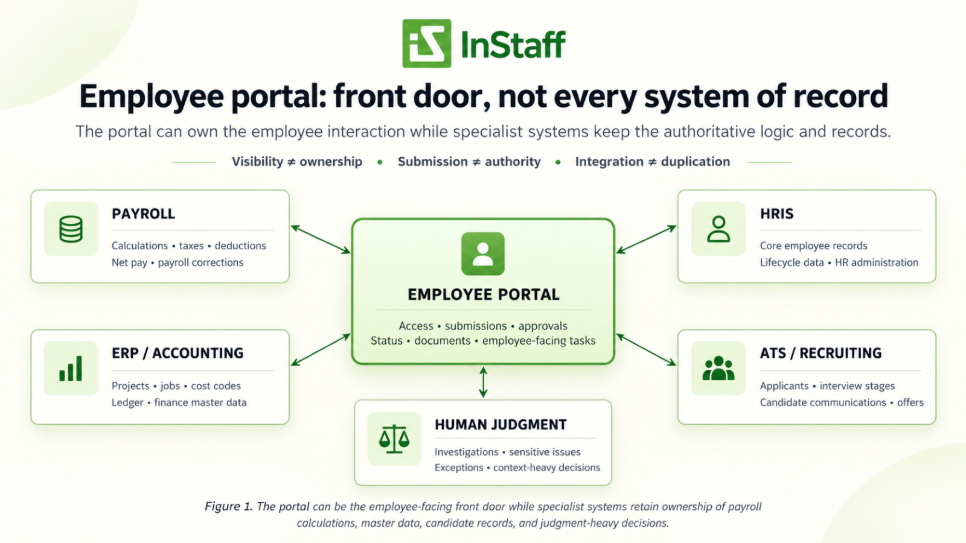
Figure 1. The portal can be the employee-facing front door while specialist systems retain ownership of payroll calculations, master data, candidate records, and judgment-heavy decisions.
Payroll: The Portal Can Deliver the Result Without Calculating It
Paystubs are a good example of where the boundary matters.
If an employee needs a paystub from seven months ago, payroll should not have to search for the file and resend it every time.
That is a distribution and retrieval problem.
Payroll calculations are different. Before a paystub exists, payroll may process hours, earnings, deductions, taxes, garnishments, adjustments, benefits, and other rules. The paystub is the output of that work.
A clean handoff is:
Approved payroll inputs → payroll calculates the pay run → completed pay documents become available to employees
The portal can own the last part without owning the calculation. Our Paystubs & Tax Forms module follows that model: employees can access payroll documents and history while the business keeps its existing payroll process.
Time Tracking: Employees Can Use Job Codes Without the Portal Owning Them
Now consider a project-based company. An employee enters eight hours against a job, phase, or cost code.
From the employee’s perspective, the entire task happens on one screen.
Behind that screen, however, the job structure may belong to an ERP or accounting platform because finance uses it for billing, job costing, project reporting, or the general ledger.
If the portal maintains a separate list of jobs and cost codes, the company can end up with two versions of data that were supposed to be authoritative.
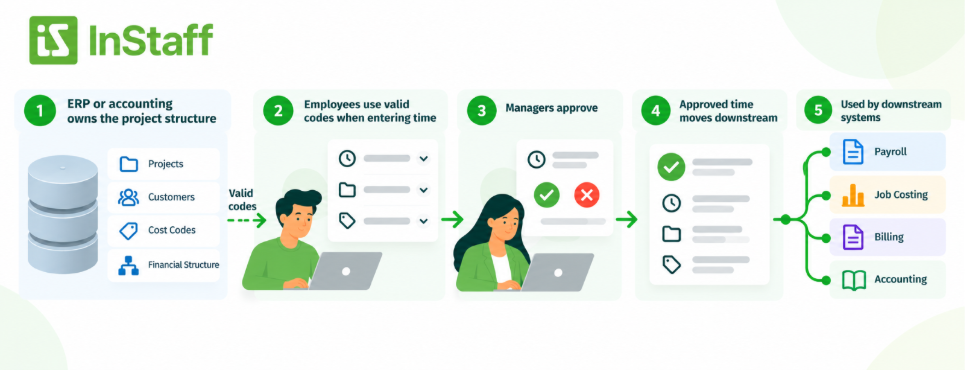
A cleaner setup is often:
ERP or accounting owns the project structure → employees use valid codes when entering time → managers approve → approved time moves downstream
The portal owns the interaction, not necessarily the master data. That is the useful role of Time Tracking: making time entry and approval easier without forcing the employee-facing system to become the financial system of record.
Recruiting Usually Has a Natural Boundary at Hire
A candidate may eventually become an employee, but candidate records serve a different purpose. Recruiting systems may need to manage applications, resumes, interview stages, evaluation notes, candidate communications, job postings, and offers.
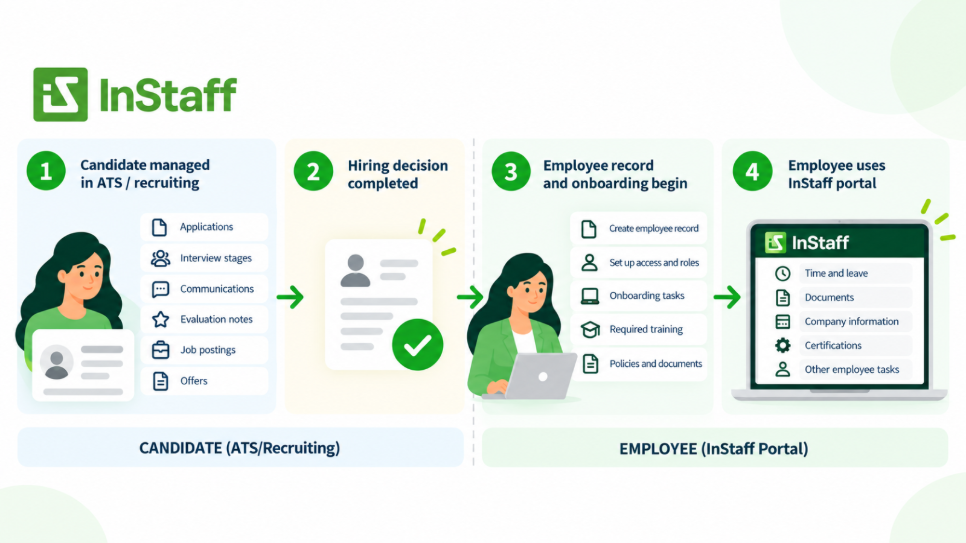
Those records have different users, permissions, and workflows is often:
Candidate managed in ATS/recruiting → hiring decision completed → employee record and onboarding begin
The portal can become important after hiring without recreating the candidate pipeline.
An Employee Record Change Is Not Always a Direct Edit
“Let employees update their own information” sounds simple until you ask which information.
A home address can affect payroll or tax records. Banking information affects payment. A manager or department of change may affect approvals, permissions, reporting, or costing.
The employee can still start the change in self-service. But submission does not have to mean immediate ownership.
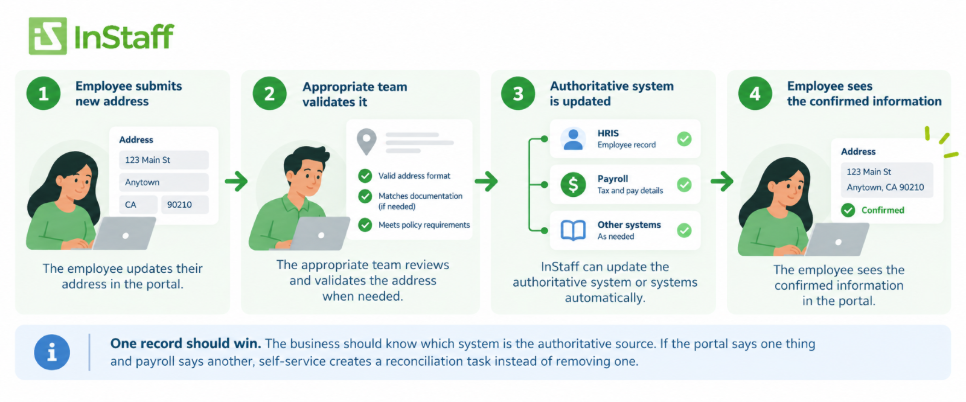
For example:
Employee submits new address → appropriate team validates it where needed → authoritative system is updated → employee sees the confirmed information
Integration may handle the update automatically. What matters is that the business knows which record wins. If the portal says one thing and payroll says another, self-service has created a reconciliation task instead of removing one.
The Real Risk Is Multiple Owners
Growing businesses often use several systems, and that is not automatically a problem.
The payroll system can be good for calculating. ERP can be good at project and financial records. HRIS can be good at core employee data. A portal can be good at the tasks employees and managers need to complete.
Problems begin when the same information is maintained independently in several places.
A department changes in the HRIS but not in payroll. A job closes in the ERP but remains selectable on a timesheet. An employee updates an address in the portal, but no one knows whether payroll received the change.
That is the difference between integration and duplication.
Integration lets systems exchange information while keeping an agreed owner. Duplication creates another copy that someone has to remember to maintain.
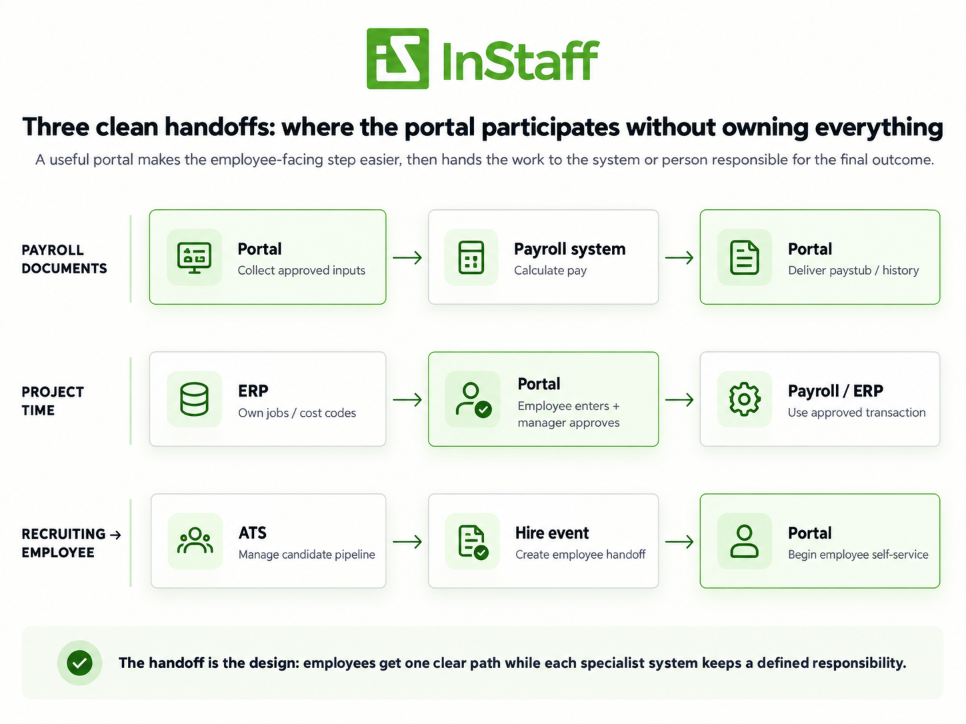
Figure 2. Clean handoffs let the portal simplify employee work without duplicating the specialist system that owns the underlying record.
During a Vendor Demo, Ask What Happens After Submit
Portal demos naturally emphasize the dashboard, form, mobile view, and approval button. Those things matter, but the better buying questions start after the employee clicks Submit.
Ask where the information goes next, which system becomes the final record, whether the same data must be maintained twice, and how corrections get back to the employee.
For a workflow that touches another system, ask to see the handoff. A polished form is useful; a clear downstream process is what makes it operationally useful.
Where InStaff Fits
InStaff is positioned as an employee operations platform that can work alongside the payroll, accounting, HR, and ERP systems a business already uses.
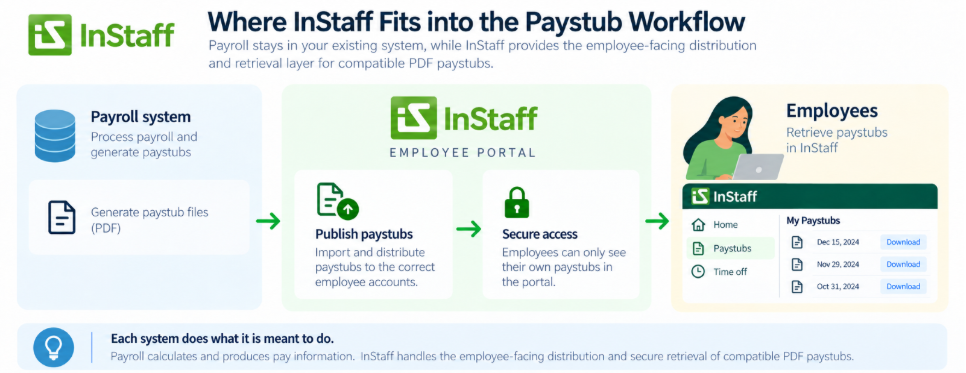
Our modules cover employee-facing workflows such as paystubs and tax forms, time tracking, time off, documents, records, expenses, certifications, and announcements.
That means a business can use InStaff to distribute payroll documents without moving payroll calculation into the portal.
Employees can also enter time against company-defined jobs without making the portal the accounting ledger. Expense reports can be collected and approved before approved information moves to finance. Employee records can be made easier to access while the organization remains deliberate about where authoritative data lives.
The point is not to keep specialized systems isolated. It is to let each system remain responsible for the work it is meant to own.
Frequently Asked Questions About Employee Portal Scope
Can an employee portal replace payroll software?
Usually not if the business still needs software to calculate earnings, deductions, taxes, and net pay. A portal can collect approved inputs and give employees access to payroll documents while payroll remains responsible for calculation.
Should employee records live in the portal or an HRIS?
It depends on which system the organization designates as authoritative. Employees may view or submit changes through the portal while the HRIS remains in the system of record.
Can an employee portal replace an applicant tracking system?
Not necessarily. An ATS is built around candidates, applications, interviews, and hiring stages, while an employee portal is typically focused on people after they become employees.
Should job and project codes be managed in an employee portal?
If those codes drive accounting, billing, or job costing, the ERP or accounting system will often be the better authoritative source. The portal can still present valid codes to employees when they enter time or expenses.
The Best Employee Portal Knows Where Its Job Ends
An employee portal does not become more useful every time another business process is moved into it.
Sometimes the better design is for the portal to stop at the right point: give the employee access, collect the information, make status visible, route an approval, and then hand the transaction to payroll, HR, recruiting, finance, or ERP.
That is not a limitation.
It is what keeps the portal from becoming another database the business must reconcile.
When evaluating employee portal scope, pay attention to the handoffs as closely as the features. Employees should get a simple experience while the business can still answer one basic question for every important record:
Who owns this when it matters?
Talk with our team at InStaff today to help you with Employee Portal.


