

A company can buy an employee portal and still leave employees emailing payroll for paystubs; managers approving time off in their inboxes, and HR hunting through folders for the latest document.
The problem is not necessarily that the portal is missing features.
It may be that the features do not cover the work people actually need to do.
That is why evaluating employee portal features should start with workflows, not a vendor checklist.
A useful employee portal should answer five practical questions:
- Access: Can employees find the information and documents they should be able to retrieve themselves?
- Workflow: Can employees submit routine requests, and can managers move those requests forward without rebuilding the process in email?
- Control: Can the business decide who sees what, which version is current, and what record should be retained?
- Connection: Can information move to and from payroll, HR, accounting, ERP, or other systems without unnecessary re-entry?
- Support: Can the portal be configured, implemented, and maintained around the way the business actually operates?
This guide uses those five layers to evaluate what an employee portal should include across self-service, pay documents, time tracking, time off, employee records, documents, communication, integrations, security, and support.
The goal is to find the one that gives employees a reliable place to complete routine work while keeping the right controls and back-office systems in place.
Employee Portal Features: The Short Buyer Checklist
A practical employee portal should usually cover more than a homepage and a document library. For a growing business, the core requirements often look like this:
| Area | What the Portal Should Let People Do | What to Evaluate Beyond the Checkbox |
| Employee self-service | Find pay documents, forms, balances, records, and routine information | Is the information current, easy to find, and limited to the right employee? |
| Paystubs and tax forms | Retrieve current and historical payroll documents | Does it work with the payroll process already in place? |
| Time tracking | Record hours, jobs, tasks, or clock activity | Can rules, approvals, corrections, and payroll handoff match the business? |
| Time off | Check balances, submit requests, view status | Who approves, how are exceptions handled, and where is the authoritative balance? |
| Documents | Access company files and personal employee documents | Can visibility, versioning, signatures, and private records be controlled? |
| Employee records | View or maintain appropriate employee information | Which fields are authoritative, editable, restricted, or synchronized elsewhere? |
| Certifications | Upload credentials and track expiry dates | Can admins define credential types, reminders, and reporting? |
| Communication | Publish company updates and collect feedback | Can messages be targeted and can the company tell whether important notices were seen? |
| Expenses | Submit receipts and route reports for approval | Can required fields, approvals, corrections, and accounting exports be configured? |
| Security | Authenticate users and restrict access | Does the portal support MFA, role-based permissions, account controls, and appropriate record visibility? |
| Integration | Exchange information with existing systems | Is there an export, import, API, native integration, or defined handoff process? |
| Support | Get help during setup and after launch | Who configures the workflows, trains admins, and helps when the process changes? |
This is a starting point, not a requirement that every company turns on every module.
A ten-person office distributing paystubs manually may need a very different portal from a 600-person field organization for tracking time, certifications, leave, and expenses.
The real test is whether the portal supports employee workflows causing administrative work today.
Layer 1: Access – What Should Employees Be Able to Find Without Asking Someone?
The most basic job of an employee self-service portal is to stop making employees ask another person for information that already exists.
That sounds obvious, but it is a useful buying test.
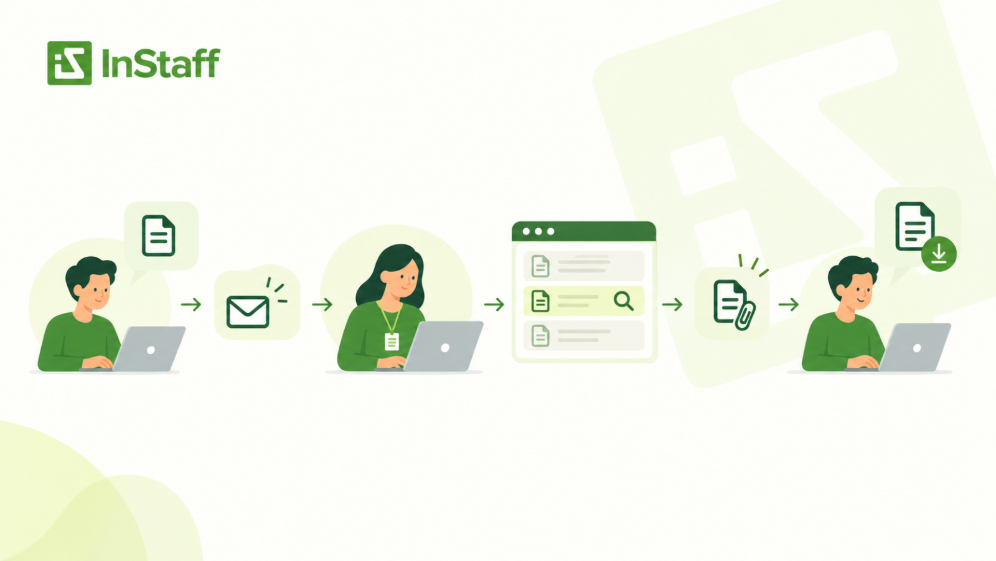
Take a common payroll request:
Employee needs old paystub → emails payroll → payroll searches → payroll attaches document → employee downloads it
If payroll is not deciding, correcting information, or adding context, the portal should be able to remove that retrieval step.
The employee should be able to sign in, locate the document, and retrieve it.
The same logic applies to other routine information:
- Tax forms that have already been issued
- PTO balances
- Request status
- Company handbooks
- Common forms
- Personal employee documents
- Certification records
- Coworkers contact or directory information
SHRM defines employee self-service portals as centralized online tools through which employees can access relevant information and complete certain transactions. That definition is broad, so buyers still need to ask what employees can actually do once they log in.
Paystubs should include historical access
A paystub feature is not very useful if employees can see only the most recent document or still need payroll to retrieve older records.
A stronger workflow is:
Payroll distributes documents → documents remain available to the assigned employee → employee retrieves them when needed
InStaff’s Paystubs & Tax Forms module is built around that model: businesses can distribute payroll documents while employees keep self-service access to their own pay history without replacing the payroll system that created the documents.
When comparing portals, ask:
- Can employees retrieve historical documents?
- Are documents automatically assigned to the right employee?
- Can administrators distribute payroll documents in batches?
- Does the portal require the company to change payroll systems?
- What happens when a document is incorrect or needs replacement?
That last question matters because access and correction are different workflows.
A portal can give an employee access to a paystub. Payroll still owns the investigation when the paystub itself appears wrong.
Self-service should be easier than email
A technically available feature is not necessarily useful for self-service.
If an employee must navigate six menus, remember an unusual workflow, or ask HR where the document is stored, the portal has not removed much friction.
During a demo, do not only watch the administrator screen.
Ask the vendor to show the process from the employee’s point of view:
- I need my paystub from March. Where do I go?
- I want to know whether my vacation request was approved. Where do I look?
- I need the latest handbook. How do I know I found the current version?
A useful employee portal should make those routine paths obvious.
Layer 2: Workflow – What Can Employees Submit, and What Happens Next?
Access solves only one category of employee administration.
Many requests involve action.
The employee needs to submit a timesheet, request leave, upload a certification, sign a document, or file an expense.
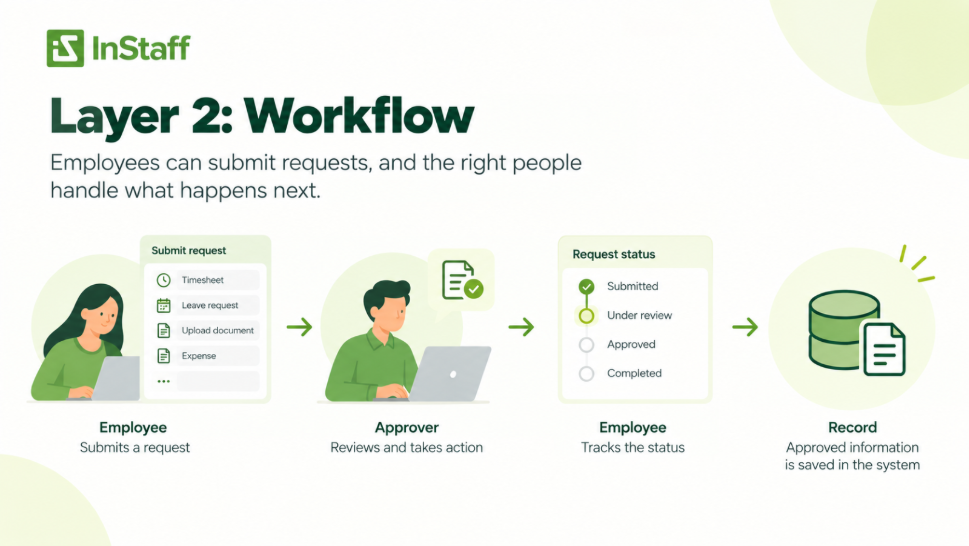
That means the portal needs more than a form.
It needs a workflow.
A useful workflow answers:
- What information must the employee provide?
- Which fields are required?
- Who receives the submission?
- Is approval required?
- Can the request be returned for correction?
- Can the employee see the status?
- What becomes the final record?
- Where does approved information go next?
If the portal collects data, but administrators still rebuild the process in email or spreadsheets afterward, the workflow is incomplete.
Time Tracking Should Cover the Path to Payroll
Many products can record an employee’s start and end time.
The harder questions come after the punch.
A business may need to track:
- Regular hours
- Overtime
- Breaks
- Job numbers
- Tasks
- Departments
- Locations
- Billable work
- Notes or custom fields
Then someone may need to review or approve those hours before payroll.
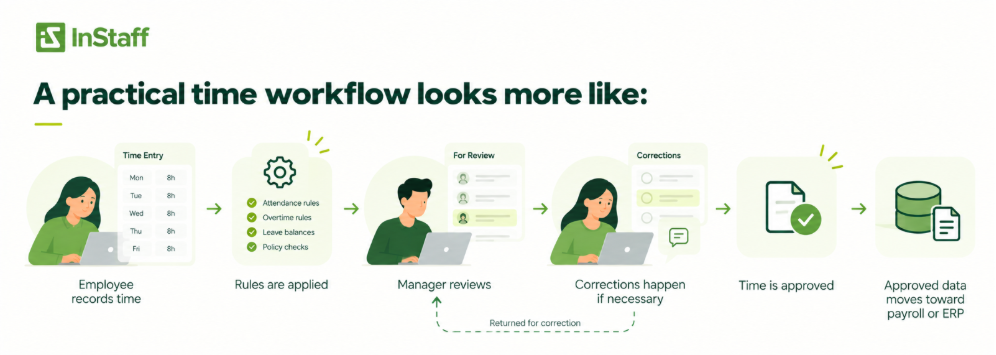
A practical time workflow looks more like:
Employee records time → rules are applied → manager reviews → corrections happen if necessary → time is approved → approved data moves toward payroll or ERP
That is why buyers evaluating employee time tracking should ask about approval rules, job or project fields, reporting, and payroll handoff rather than stopping at mobile clock-in.
For field or shift-based teams, the method of recording time also matters. Employees may need a mobile device, shared terminal, QR code, location-based verification, or another setup that fits where the work occurs.
The feature should fit the workforce, not force every employee into the same entry method.
Time Off Needs a Request Workflow and a Decision Boundary
A useful time-off feature should let employees handle the predictable parts themselves:
- Check an available balance
- Choose the appropriate request type
- Select dates
- Submit the request
- See the status
- Review previous requests
But employee self-service should not erase the approval boundary.
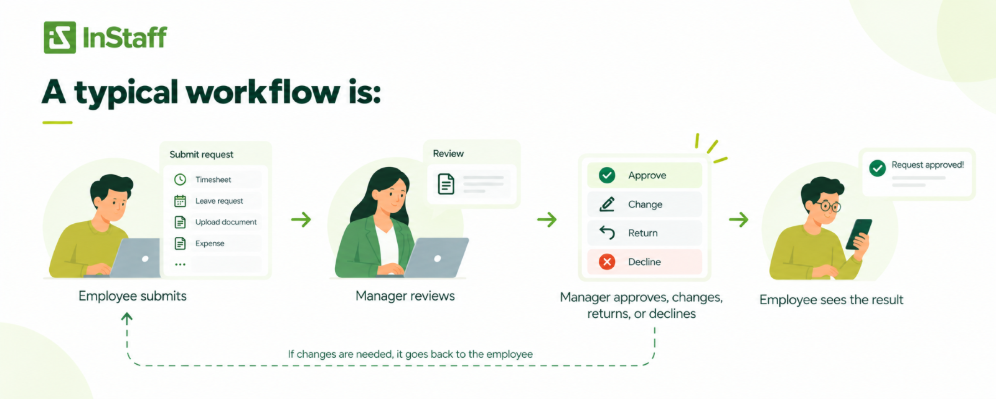
A typical workflow is:
Employee submits → manager reviews → manager approves, changes, returns, or declines → employee sees the result
Our Time -Off Requests module supports employee balance visibility and configurable approval workflows while managers remain responsible for the decision.
When evaluating a portal, ask what happens when the process is not standard.
Can an administrator submit on behalf of an employee?
Can a request be changed after submission?
Can the company define different leave types?
Can managers see overlapping time off?
Where is the balance calculated, and what happens if another system shows a different number?
Those questions tell you more than the checkbox labeled “PTO management.”
Documents Should Cover Access, Privacy, Version Control, and Completion
“Document management” can mean very different things.
At the simplest level, it may mean uploading PDFs into folders.
But employee documents usually have at least four different jobs:
- Company-wide access – policies, handbooks, guides, and forms employees should be able to find.
- Restricted employee records – contracts, evaluations, insurance documents, or other files that should be visible only to specific people.
- Completion – documents that need acknowledgement or electronic signature.
- Credential tracking – certifications or licenses with acquisition and expiry dates.
A portal should not treat those as if they have the same access requirements.
Ask who can see each document, not only where it is stored
A company’s handbook and a private employment document may both be PDFs, but they should not necessarily live under the same permission model.
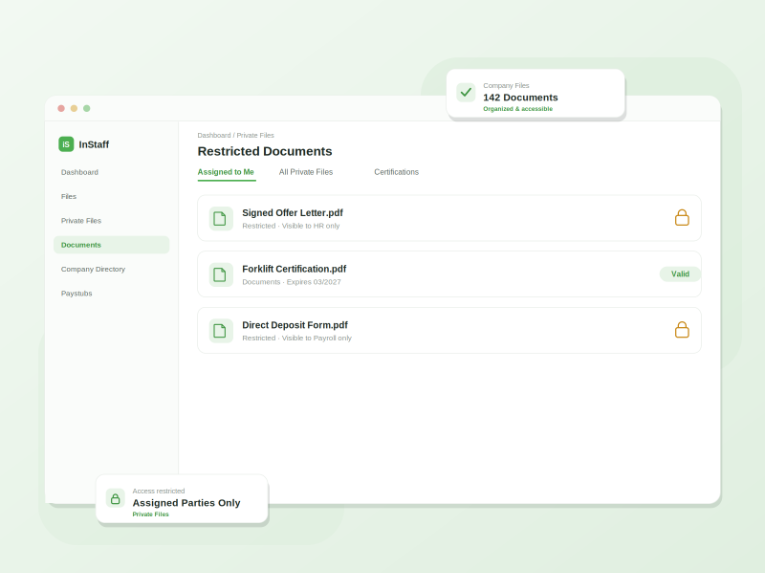
InStaff’s Employee Records Hub separates company-wide files from restricted private files and supports role-based document access. Its document tools also allow administrators to publish materials to the whole company, a department, or an individual employee.
That distinction is more useful than a generic “unlimited document storage” promise.
During evaluation, test scenarios such as:
- Can an employee see only their personal documents?
- Can a manager see documents for direct reports without seeing everyone else’s records?
- Can one policy be published company-wide while another is limited to one department?
- Can an administrator replace an outdated file, so employees stop using the old version?
- What happens to access when someone changes roles or leaves the company?
The feature is not storage.
The feature is controlled access to the correct record.
Certification Tracking Should Be More Than a Folder of PDFs
For organizations where employees need licenses, training records, safety credentials, or professional certifications, simply storing the file is not enough.
The company may need to know:
- What type of certification the employee holds
- When it was acquired
- When it expires
- Whether supporting proof is attached
- Which employees are approaching expiry
- Who needs to act
InStaff’s Digital Documents & Certifications tools allow certification types, acquisition and expiry dates, supporting documents, reminders, and reporting.
A buyer should therefore distinguish between document storage and credential management.
One answers, “Where is the certificate?”
The other answers “Who is expiring next month?”
Employee Records Should Make Ownership Clear
An employee portal may display names, addresses, departments, managers, contact information, employment documents, and other employee data.
That does not automatically mean the portal should own all of those records.
A useful evaluation question is:
Which system is the source of truth for each field?
For example, an employee’s home address may exist in:
- Payroll
- HRIS
- Benefits system
- ERP
- Employee portal
If an employee updates the address in the portal, what happens next?
Possibilities include:
Employee edits record → connected system updates automatically
or:
Employee submits change → administrator reviews → source system is updated
or:
Employee can view the record but must contact an administrator to change it
Any of those can be valid depending on the process.
What is dangerous is not knowing which one applies.
A good employee-record feature should make permissions, ownership, and downstream updates clear instead of creating another copy of employee data that gradually becomes inconsistent.
Layer 3: Control – Can the Business Govern the Portal Properly?
Employee portals contain information people should not necessarily be able to see just because they have a login.
That makes security and permissions part of the product requirement, not an IT afterthought.
SHRM’s current HR technology guidance Identifies authentication, multi-factor authentication, role-based access, secure personnel records, and employee self-service as foundational HR-system capabilities. Those same concepts are useful when evaluating an employee portal because payroll documents and personnel records are sensitive even when the portal is not a full HRIS.
Multi-factor authentication should be part of the security conversation
A password is one control.
For a portal containing pay documents and employee records, buyers should ask whether the vendor supports multi-factor authentication (MFA) and how account recovery works.
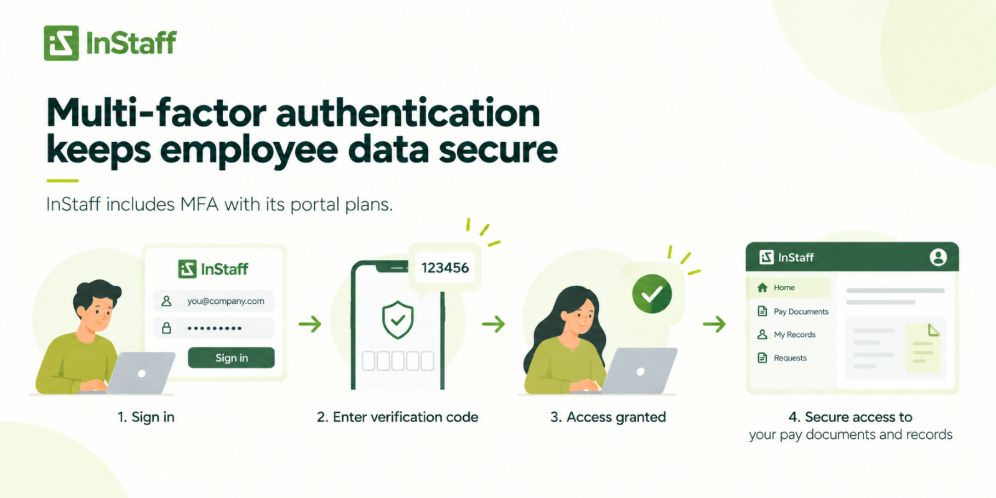
InStaff currently includes MFA with its portal plans.
But MFA is only one part of access control.
Role-based access matters more than “everyone gets a login”
Employees, managers, payroll administrators, HR staff, finance teams, and system administrators do not need the same permissions.
Ask whether the portal can separate access by:
- Employee
- Manager
- Department
- Module
- Document
- Administrative role
Then test real scenarios.
Can a manager approve time without seeing payroll documents?
Can finance review expenses without accessing private HR files?
Can an employee retrieve their own tax form without seeing anyone else’s?
A permission model is useful when it follows actual responsibilities.
Audit history matters for workflows that change records
When a process includes approvals, corrections, comments, or exports, the business may need to know what happened and when.
For expense workflows, for example, InStaff records submissions, comments, changes, approvals, and export activity as part of the report’s history.
For other portal areas, ask the vendor what activity is retained and available to administrators.
Do not assume that a digital workflow automatically creates the audit history your business expects.
Layer 4: Connection – How Does the Portal Fit with Payroll, HR, ERP, and Accounting?
A portal can have excellent employee-facing features and still create administrative work if nobody has defined what happens to the data afterward.
Consider timesheets.
Employees record hours in the portal.
Managers approve of them.
Then what?
If payroll must manually re-key every approved hour, the company has improved collection but left the final handoff manual.
The same question applies to:
- Employee updates
- PTO balances
- Expenses
- Job numbers
- Cost codes
- Payroll documents
- Employee status
Do not ask only, “Does it integrate?”
“Integration” can mean:
- Native integration
- API connection
- Scheduled import
- Structured export
- CSV file
- Custom interface
- Manual upload
Those are not the same thing, but any one of them may be appropriate depending on the workflow.
Instead, ask:
What information needs to be removed?
In which direction?
How often?
Which system remains authoritative afterward?
Who fixes the mismatch if two systems disagree?
That is the integration test that matters: not whether a vendor can show a logo on an integrations page, but whether your specific data can reach the next system in usable form.
Communication Features Should Make Important Information Easier to Find Later
Employee communication is another area where a portal should do something different from ordinary email.
Emails are useful for conversation.
A portal can be useful for persistent company information.
Examples include:
- Policy changes
- Payroll reminders
- Office or site notices
- Benefits deadlines
- Safety updates
- Company announcements
- Surveys
The advantage is not simply that a message can be posted online.
The portal should help employees find the update later and help administrators understand who received or acknowledged important information where appropriate.
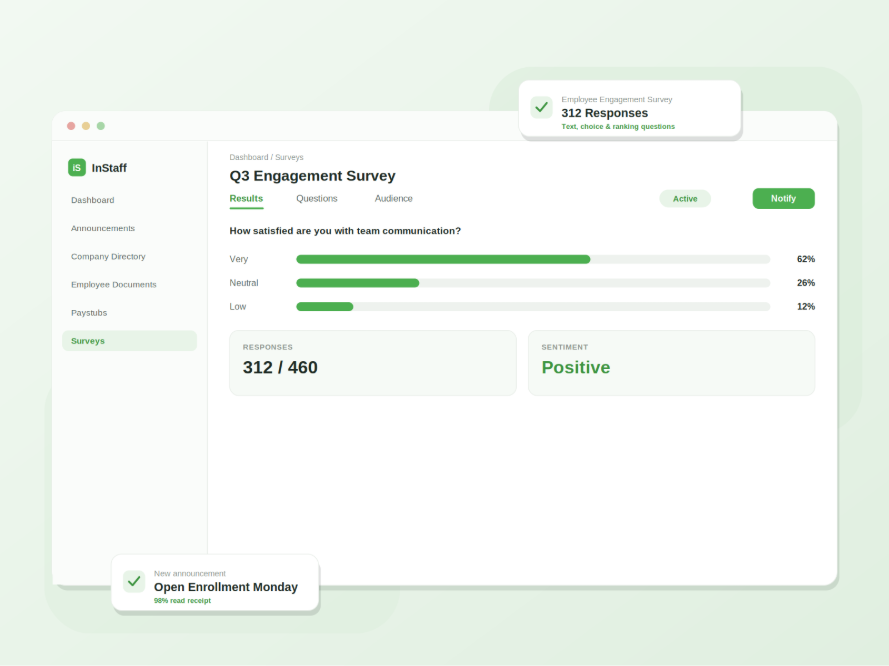
InStaff’s Announcements & Surveys module supports targeted announcements, scheduled publishing, read tracking, surveys, and response reporting.
When comparing communication features, ask:
- Can updates be targeted by employees or department?
- Can administrators schedule publication?
- Can employees find previous announcements?
- Can the company see whether important notices were read?
- Can surveys collect structured feedback rather than creating another email chain?
A portal does not need to replace chat or email.
Its job is to give recurring and important employee information to a reliable home.
Expense Management Is a Good Test of Whether the Portal Handles Complete Workflows
Expenses are useful during a portal demo because they touch several roles.
The employee enters information and attaches a receipt.
A manager may review the report.
Finance needs approved data.
A correction may send the report back to the employee.
The final information may need to reach payroll, accounting, or ERP.
That workflow exposes whether the portal can handle more than simple self-service.
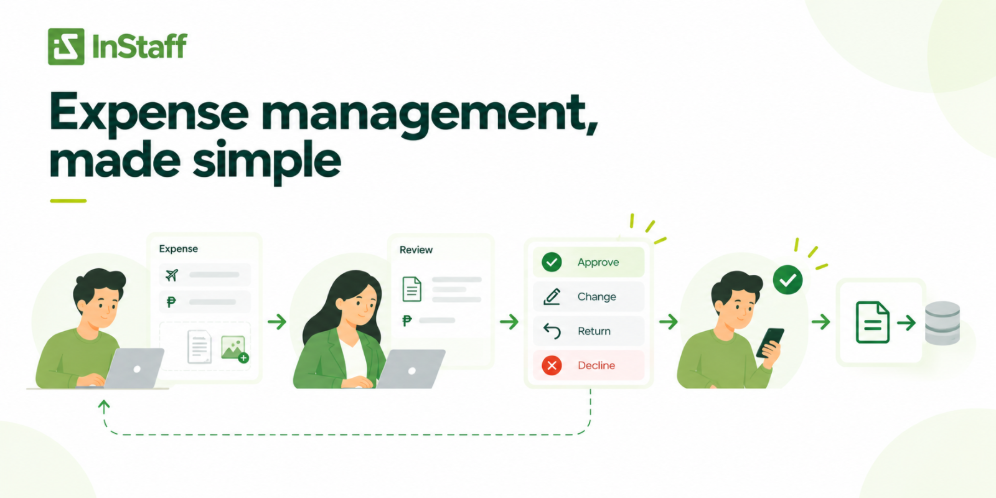
An expense Management module supports digital expense entry, receipt attachments, configurable approval of workflows, corrections, activity history, and export-ready data.
Even if expense management is not part of your immediate project, use a similar multi-step workflow to test how the vendor handles handoffs.
A good portal should make ownership clear at every stage.
Layer 5: Support – Who Helps Turn the Features into a Working Process?
Support is easy to treat as a procurement detail.
For employee software, it can determine whether the workflows actually get implemented correctly.
A portal may need decisions about:
- Employee data setup
- Permission groups
- Time-off types
- Approval paths
- Job fields
- Document structure
- Payroll exports
- Integration requirements
- Administrator training
- Employee rollout
Those are business-process decisions, not only software settings.
When evaluating vendors, ask what happens after purchase.
Questions to ask about implementation and support
- Who helps configure the portal?
- Is administrator training included?
- Who maps approval workflows?
- Can the vendor help with imports or integration requirements?
- What support channels are available after launch?
- Is support limited to administrators or available directly to employees?
- What happens when the business wants to change the workflow six months later?
- Will the same team understand the configuration already in place?
InStaff’s published terms currently include basic technical support for portal administrators by phone, email, or web conference during regular business hours, and its product positioning emphasizes setup and configuration around existing business processes.
That does not mean every buyer needs high-touch implementation.
It means buyers should decide how much help they need before comparing subscription prices alone.
Mobile Access Matters, but “We Have an App” Is Not the Real Requirement
Many employees will use a portal away from the desk.
Field teams may clock in on a phone.
Managers may approve leave while traveling.
Employees may upload an expense receipt immediately after purchase.
The useful question is not simply whether the vendor has a mobile app.
It is whether the important workflows work properly on the devices employees actually use.
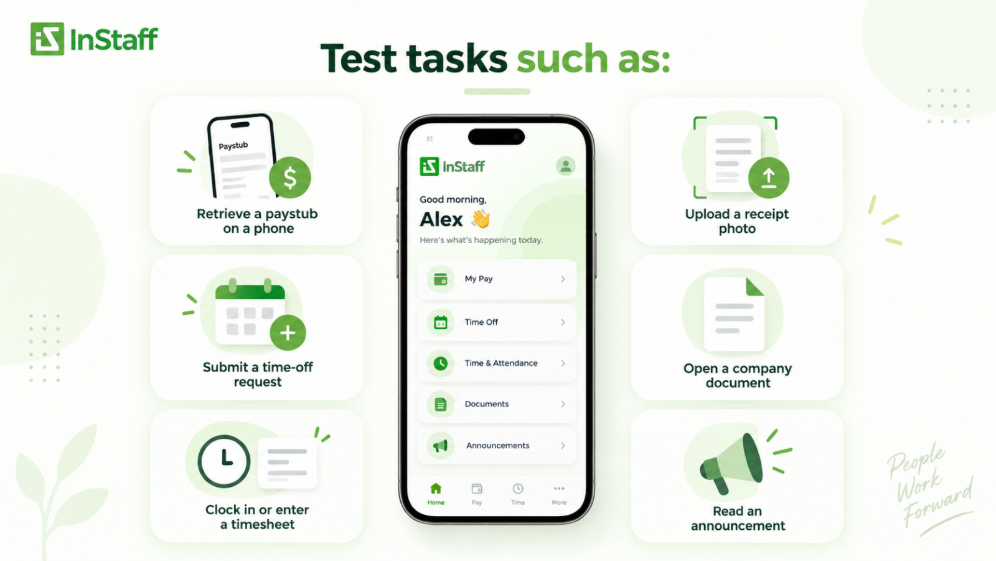
Test tasks such as:
- Retrieve a paystub on a phone
- Submit a time-off request
- Clock in or enter a timesheet
- Upload a receipt photo
- Open a company document
- Read an announcement
That may matter more for some workforces than having a separate app store download.
A Modular Portal Can Be Better Than Buying Every Feature at Once
A buyer guide should also ask which features the company needs now.
A growing business may begin with paystub distribution because payroll is answering repeated document requests.
Later, it may add time to tracking.
Then time off.
Then documents or expenses.
That phased approach can be easier than trying to redesign every employee’s process during one implementation.
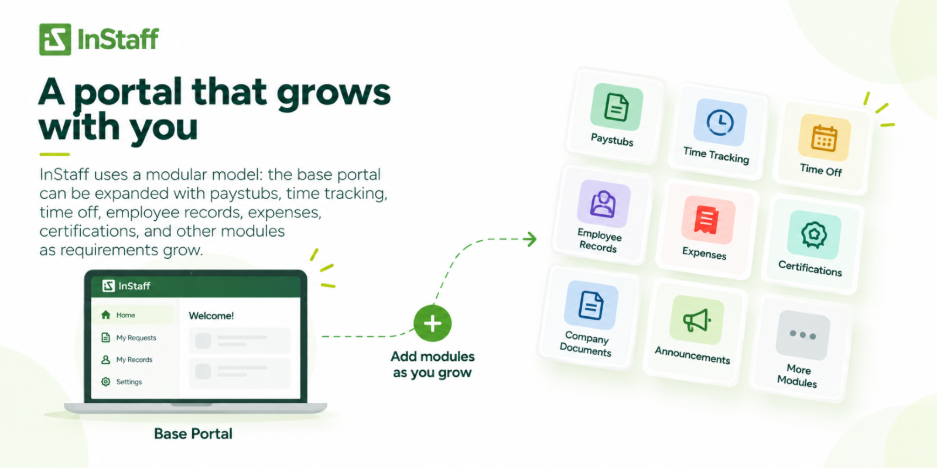
At InStaff, we use a modular model: the base portal can be expanded with paystubs, time tracking, time off, employee records, expenses, certifications, and other modules as requirements grow.
The larger lesson applies beyond one vendor.
During evaluation, separate features into three groups:
Needed at launch
These solve the workflows, creating the most administrative work now.
Needed within the next year
These are realistic growth requirements the chosen platform should be able to support.
Nice to have
These should not outweigh a weak implementation of the workflows people will use every week.
That prevents a long feature list from dominating the buying decision.
How to Evaluate Employee Portal Features in a Vendor Demo
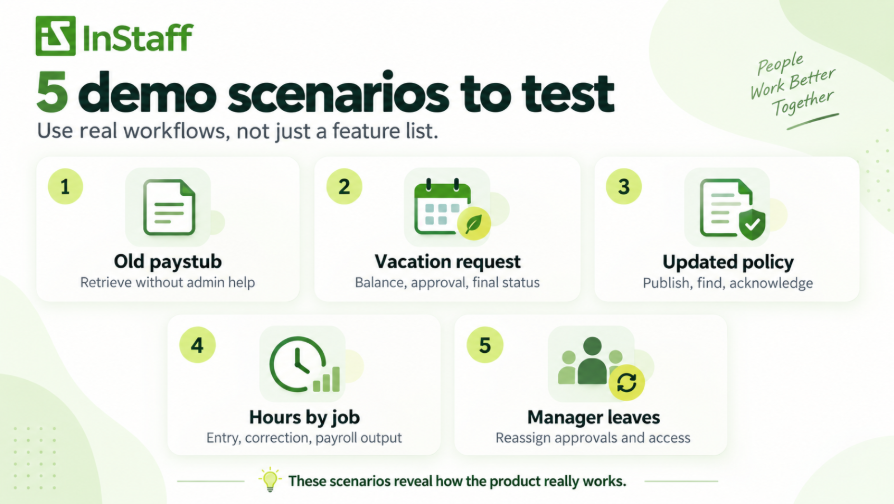
A demo is much more useful when you give the vendor a process instead of asking them to click through menus. Bring five real scenarios from your current operation.
For example:
Scenario 1: An employee needs an old paystub
Ask the vendor to show the employee retrieving it without administrator involvement.
Scenario 2: An employee submits vacation
Ask to see balance visibility, submission, manager approval, a returned request, and final status.
Scenario 3: HR publishes an updated policy
Ask how employees find it, who can see it, how the old version is handled, and whether acknowledgement can be tracked if required.
Scenario 4: An employee records hours against a job
Ask to see the job field, manager approval, correction process, and the output that payroll or ERP receives.
Scenario 5: A manager leaves the company
Ask what happens to their approvals, employee visibility, permissions, and outstanding requests.
These scenarios reveal the product’s actual operating model.
Feature grid rarely does.
A Practical Employee Portal Evaluation Scorecard
Use a scorecard based on the workflow rather than the number of available modules.
| Evaluation Area | Questions to Ask | Strong Signal |
| Employee access | Can employees find routine information without help? | Common tasks take only a few obvious steps |
| Workflow completeness | Does the portal handle submission through final disposition? | Approvals, corrections, status, and final records stay connected |
| Permissions | Can access reflect real employee and manager roles? | Sensitive data is restricted without creating admin workarounds |
| Data ownership | Is the source of truth clear? | Everyone knows which system owns each record |
| Integration | Can approved data reach the next system? | Handoffs are defined and do not depend on re-keying |
| Configuration | Can rules reflect company policy? | Fields, approval paths, categories, and permissions can be adjusted |
| Employee usability | Can employees complete common tasks from their normal devices? | Routine requests are easier than sending an email |
| Administration | Can HR/payroll see what is pending and what needs attention? | Work is visible without maintaining shadow spreadsheets |
| Security | Are authentication and permissions appropriate for employee data? | MFA and role-based access are supported |
| Support | Can the vendor help with configuration and changes? | Support understands both the software and the implemented workflow |
You do not need to assign every row with the same weight.
If payroll administration is the main problem, integration and time workflow may matter more than surveys.
If employee documents are the main problem, permissions and version control may carry more weight than time tracking.
The scorecard should reflect the problem that caused the company to shop for a portal in the first place.
Where InStaff Fits
InStaff is a configurable employee operations platform built around employee-facing workflows rather than requiring a business to replace its payroll, accounting, HR, or ERP systems.
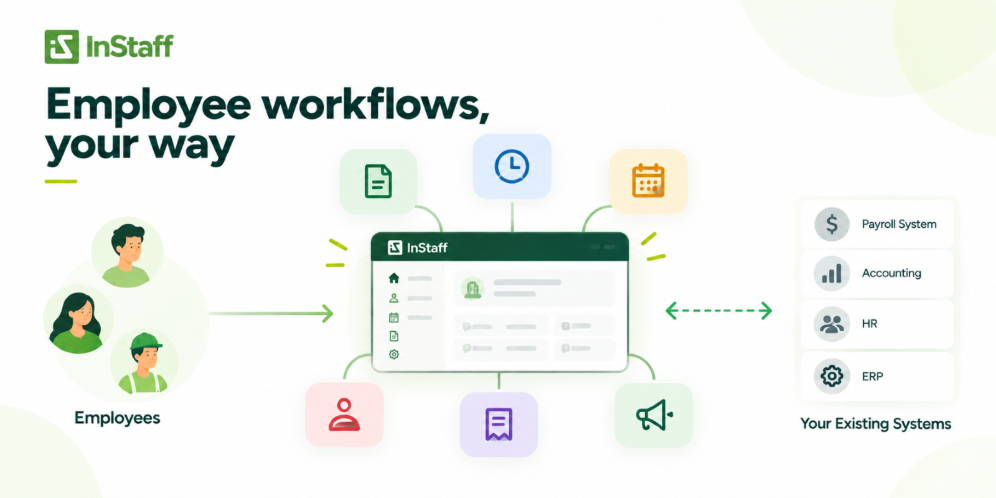
Every portal can bring several everyday processes into one employee-facing environment, including:
- Employee directory and org chart
The platform is modular, so those workflows do not need to be implemented at once.
That makes the evaluation question straightforward:
Which employee workflows are still being handled through email, spreadsheets, paper, or repeated manual lookups?
Those are the areas to test first.
If the company needs a full HR system of record, broad benefits administration, recruiting, performance management, or other core HR functions, those requirements should be evaluated separately rather than assuming an employee portal should become a full HRIS.
A good portal is valuable partly because it knows what job it is supposed to do.
Frequently Asked Questions
What are the most important employee portal features for a growing business?
The most important features are the ones that remove recurring employee and administrator handoffs: self-service document access, time and leave workflows, controlled employee records, communication, and clear approvals. The portal should also provide appropriate permissions, a defined connection to payroll or other source systems, and usable administrator support. A long feature list matters less if the company’s highest-volume workflows still require email or re-entry.
Should an employee portal include payroll?
Not necessarily. A portal can give employees access to paystubs and tax forms while an existing payroll system continues to calculate payroll and remain in the payroll system of record. The important question is how payroll information reaches the portal and how corrections are handled.
What should employees be able to do in an employee portal?
Employees should usually be able to retrieve information they are authorized to see and complete predictable parts of routine workflows. That can include accessing pay documents, checking leave balances, submitting time or expenses, downloading forms, and viewing request status. Tasks requiring investigation, sensitive discussion, or exceptions should still have a clear path to a person.
Does an employee portal need document management?
For many organizations, yes, because repeated document requests are a common reason employees contact HR or payroll. Look beyond storage and evaluate permissions, personal employee folders, version control, signatures, certification tracking, and whether employees can reliably find the current document.
Does an employee portal need to integrate with an HRIS or payroll system?
Not every workflow requires a live integration, but the handoff between systems should be defined. Data may move through a native integration, API, import, export, or another structured process depending on the requirement. The business should know which system owns the final record and who resolves mismatches.
Is a mobile app a must-have employee portal feature?
Mobile access is important when employees need the portal away from a desk, but a dedicated app is not always necessary. What matters is whether the required tasks work reliably on the phones or tablets employees actually use. Test the real workflows rather than buying based on an app-store badge.
The Best Employee Portal Has the Most Features
A useful employee portal should reduce the distance between an employee’s need and the system or person responsible for completing it.
Sometimes that means self-service access to an existing document. Sometimes it means a structured request with manager approval. Sometimes it means controlled access to an employee’s record.
That is why the strongest employee portal evaluation is not:
How many features does this platform have?
It is:
Which recurring employee workflows can this platform make complete, controlled, and easier to follow?
Start with the processes your team handles repeatedly today. Map who touches them, where the source of information lives, what approvals are required, and where the final record needs to go.
Then ask the vendor to show the exact workflows.
That will tell you much more about the portal than a feature list ever will.
Contact us today at InStaff to learn more about employee portals, we’d be happy to help!


