

A growing company starts running into employee admin problems.
Timesheets still arrive through spreadsheets. Managers approve vacation over email. Employees ask payroll for old paystubs. Documents are scattered across inboxes and shared folders.
Someone eventually says:
“Maybe we need an HRIS.”
Sometimes that is exactly right.
If the business needs a central system to manage employee records, benefits, recruiting, performance, payroll-related data, and other core HR functions, an HRIS may be the appropriate next step.
But sometimes the company already has systems handling payroll, accounting, or employee records reasonably well.
The actual problem is narrower:
Employees need somewhere to access documents. Managers need a better approval process. Payroll needs cleaner timesheets. HR wants routine requests out of email.
In that situation, replacing or expanding the entire HR technology stack may solve much more than the business actually needs to be solved.
That is where the HRIS vs. employee portal comparison becomes useful.
The better question is not:
Which type of software is better?
It is:
Are you trying to replace the system that owns your employee data, or improve the workflows employees and managers use around that data?
In this guide, we will separate those two jobs, compare where an HRIS and an employee operations platform overlap, and show how a growing business can decide whether it needs one, the other, or both.
HRIS vs. Employee Operations Platform: The Short Answer
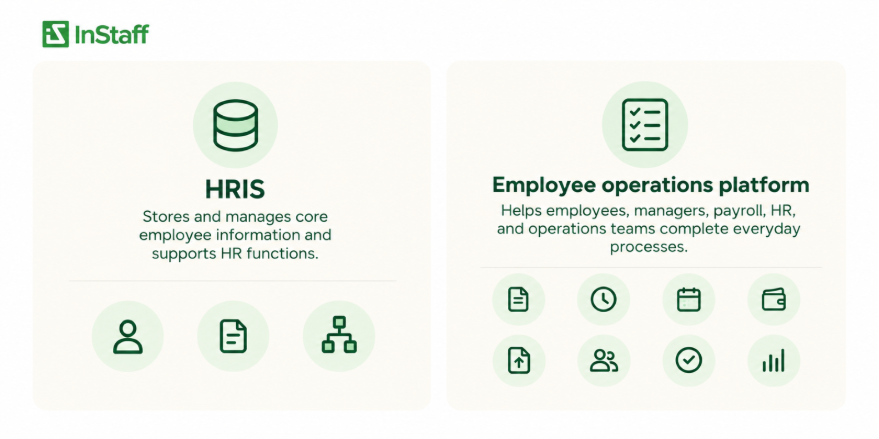
An HRIS, or Human Resources Information System, is generally designed to store and manage core employee information while supporting a broad range of HR functions.
An employee operations platform is more focused on the everyday process’s employees, managers, payroll, HR, and operations teams need to complete accessing pay documents, submitting time, requesting leave, managing documents, tracking expenses, following approvals, and similar workflows.
The distinction can be summarized like this:
| Question | HRIS | Employee Operations Platform |
| What is its main job? | Manage core HR data and processes | Make everyday employee workflows easier to complete |
| Is it usually a system of record? | Often | Not necessarily |
| Does it typically cover broad HR functions? | Yes | Usually more focused |
| Can employees use it directly? | Often | Yes |
| Can it work alongside payroll or ERP? | Yes, depending on setup | Often designed to |
| Does it require replacing existing systems? | Not always, but potentially | Not necessarily |
| Is it appropriate for a narrow workflow problem? | Sometimes | Often |
| Can both systems be used together? | Yes | Yes |
These are not rigid categories.
Modern HRIS products often include employee self-service, document management, time off, workflows, and other portal features.
Likewise, an employee operations platform can manage substantial employee-facing processes without becoming the organization’s full HR system of record.
The practical difference is usually what the business expects the software to own.
Start With One Question: What Problem Are You Actually Trying to Fix?
The phrase “we need HR software” is too broad to be useful.
Consider two growing companies.
Company A: The employee data itself is becoming difficult to manage
The business has employee information spread between spreadsheets, payroll, folders, and several disconnected systems.
It needs better control over:
- Core employee records
- Employment history
- Benefits information
- Recruiting and onboarding
- Performance processes
- Reporting
- Employee lifecycle changes
- Broader HR administration
That is a core HR systems problem.
An HRIS deserves serious consideration because the company may need a central place to own and manage the underlying employee information.
Company B: The core systems work, but the employee workflows are messy
Payroll is already running.
Accounting has already been established.
Basic employee records exist somewhere reliable.
But employees still email paystubs. PTO approvals disappear inside inboxes. Timesheets need to be cleaned up before payroll. Documents live in shared folders. Expense reports arrive through spreadsheets and attachments.
That is primarily an employee’s operations problem.
The company may not need another system to become the master database for every employee’s record.
It may need a better way for people to interact with the systems and information already in place.
This distinction should come before the software demo.
An HRIS Is Usually Built Around the Employee Record
HRIS is designed for employee information. The system may hold records such as:
- Employee identity and contact information
- Job and position information
- Department
- Manager
- Compensation information
- Employment status
- Hire and termination dates
- Benefits information
- Time-off data
- Payroll-related information
- Performance information
- Training or development records
The exact scope varies significantly from one HRIS vendor to another.
Some products stay close to core HR administration.
Others expand into recruiting, onboarding, benefits of administration, payroll, performance management, learning, workforce planning, analytics, and other functions.
That breadth can be extremely useful when the business needs a more formal HR infrastructure.
But breadth is not an advantage.
It is an advantage when the organization actually needs the functions the system is designed to provide.
An Employee Operations Platform Starts from the Workflow Instead
An employee operations platform starts with a different question:
What does the employee or manager need to get done?
That might be:
- Retrieve a paystub
- Download a tax form
- Submit a timesheet
- Request vacation
- Approve time off
- Find a company document
- Sign a form
- Upload a certification
- Submit an expense
- Find a coworker
- Read a company announcement
The data still matters.
But the focus is on the movement of information between people and systems.
For example, consider an expense report.
The important workflow may be:
Employee submits expense → receipt is attached → manager reviews → correction is requested if necessary → manager approves → approved data moves to finance or payroll
HRIS may support that process.
An employee operations platform may support it too.
The buying question is not which category sounds more sophisticated.
It is which system fits the process the company is actually trying to improve.
The Most Useful Distinction: System of Record vs. Workflow Layer
One of the easiest ways to compare the two approaches is to ask:
Where does the authoritative employee data live?
A system of record is the system the organization treats as the authoritative source for a particular type of information.
For example:
- Payroll may own payroll calculations.
- An HRIS may own core employee records.
- An ERP may own a job or project code.
- Accounting software may own general ledger information.
- A benefits platform may own benefits enrollment data.
An employee portal does not necessarily need to replace those systems.
Instead, it can become the employee-facing or manager-facing layer through which information is accessed, submitted, reviewed, and moved into the appropriate system.
Consider timesheets.
The workflow could be:
Employee enters time → manager approves → approved hours are exported or integrated into payroll or ERP
The employee operations platform manages the workflow.
Payroll or ERP can remain responsible for whatever happens next.
That architecture can make sense when the company wants better employee processes without changing the systems already responsible for payroll, finance, or core business records.
An Employee Portal Is Not Automatically an HRIS
This is an important distinction because the terms often get blurred.
An employee portal describes the employee-facing experience.
Employees log in and do something.
That may include:
- Viewing paystubs
- Checking balances
- Requesting leave
- Opening documents
- Updating information
- Completing forms
- Reviewing company announcements
But the existence of a portal does not tell you what system owns the data behind it.
The portal may be part of an HRIS.
It may sit on top of the payroll software.
It may connect to an ERP.
It may belong to a separate employee operations platform.
So, when comparing an HRIS vs. employee portal, do not compare only what the employee sees on screen.
Ask what sits behind the screen.
What Does the System Actually Own?
Suppose an employee logs in and sees:
- Name
- Address
- Manager
- PTO balance
- Paystub
- Job assignment
Those six pieces of information may come from six different processes.
The employee’s paystub may originate in payroll.
Their manager’s assignment may come from HR. Their job number may come from an ERP. Their PTO balance may be maintained inside a leave-management tool.
The portal can display all of this without necessarily becoming the authoritative source for all of it.
That is why a software evaluation should include questions such as:
Where is this data created?
Which system owns it?
How does it reach the employee?
Can the employee change it?
If they change it here, what else gets updated?
What happens when two systems disagree?
These questions are more useful than asking whether a vendor has an “employee profile” feature.
When Does a Growing Business Actually Need an HRIS?
An HRIS becomes more compelling when the company needs to formalize or centralize core HR administration, not simply improve a few employee workflows.
Signs that may point toward an HRIS include:
Employee records have no reliable home
If important employee information is maintained across spreadsheets, folders, emails, and several disconnected systems, the business may need a proper system of record.
The company needs broader employee lifecycle management
Hiring, onboarding, employee changes, performance, development, benefits, offboarding, and reporting may need to be managed as connected HR processes.
HR reporting is becoming difficult
If basic questions about headcount, turnover, departments, positions, employment status, or employee history require manual reconciliation, core HR data may need a better structure.
Benefits administration is becoming more complex
Depending on the HRIS, benefits of enrollment and related administration may be part of the platform.
The organization wants to consolidate several HR systems
A broader HRIS may make sense when the objective is intentionally to replace multiple separate HR tools with a more integrated HR environment.
HR needs stronger control over employee lifecycle data
As the organization grows, changes to positions, managers, compensation, employment status, and other records may require more formal ownership and reporting.
These are much larger requirements than simply needing employees to download their own paystubs.
When Is an Employee Operations Platform the More Appropriate Scope?
A focused employee operations platform becomes more interesting when the organization’s existing back-office systems are staying in place.
The problem is not necessarily missing HR infrastructure.
The problem is that employees and managers still depend on manual processes around it.
Examples include:
Employees keep requesting payroll documents
If payroll already creates the correct paystubs, the problem may simply be distribution.
A paystub and tax form portal can give employees direct access without replacing the payroll system that generated the documents.
Timesheets are still difficult to collect
The company may already have payroll and accounting work properly.
But if employees submit hours through spreadsheets, email, paper, or inconsistent formats, employee time tracking can improve what happens before those hours reach payroll.
PTO lives in email
The business may not need a new HR database.
It may need employees to submit requests through a defined time-off request workflow where managers can review requests, and employees can see balances and status.
Documents are scattered
If employees cannot find handbooks, forms, contracts, or personal documents, a structured Employee Records Hub may solve the access problem without requiring a full HR platform replacement.
Expenses have too many handoffs
If employees submit receipts through email and finance rebuilds the information later, employee expense management may be the actual workflow that needs attention.
These are important problems.
They are just not necessarily HRIS-sized problems.
Do Not Buy an HRIS Just Because Your Current Process Is Manual
Manual work is a symptom.
It does not tell you which category of software you need.
Suppose payroll receives 40 requests every month for old paystubs.
HRIS might solve that.
But so could a focused employee portal.
The actual requirement is:
Employees need secure access to historical payroll documents.
Now consider another company where HR cannot reliably determine which employees are active, who their managers are, what positions they hold, when compensation changes, or which benefits they are enrolled in.
That is fundamentally different.
The requirement is closer to:
The business needs a reliable core employee data structure.
That is where the case for an HRIS becomes much stronger.
Start with the requirements.
Then evaluate the software category.
Do Not Buy a Portal When You Actually Need a System of Record Either
The opposite mistake happens too.
A lightweight employee portal can become inadequate if the company expects it to behave like a full HRIS.
For example, an organization may eventually need:
- Advanced employee lifecycle management
- Complex benefits administration
- Recruiting infrastructure
- Performance management
- Compensation planning
- Workforce analytics
- Succession planning
- Learning management
- Broad regulatory workflows
- Deep employee-history reporting
If those capabilities are central to the buying decision, compare actual HRIS products that support them.
Trying to stretch a narrower portal into a job it was not designed to perform creates another kind of complexity.
A focused platform is useful partly because its scope is focused.
That advantage disappears if the organization expects it to become everything.
HRIS vs. Employee Portal
Feature matrices can be misleading because two systems may list the same feature while handling it very differently.
Consider time off.
Both products might say:
Time-Off Management ✓
But ask what that means.
Can employees see balances?
Who calculates the balances?
Can employees submit requests?
Can managers approve of them?
Are approval paths configurable?
Those questions expose the real workflow.
The same principle applies to documents, employee records, expenses, time tracking, and payroll information.
Instead of asking:
“Does the system have this feature?”
ask:
“What happens from the moment the employee starts the process until the final record reaches the system that needs it?”
A Practical HRIS vs. Employee Operations Platform Comparison
The following comparison is more useful than a simple feature checklist because it focuses on responsibility.
| Buying Question | HRIS | Employee Operations Platform |
| We need a central core employee database | Often a strong fit | May not be intended to replace it |
| Employees need their own pay documents | Often supported | Strong fit |
| We need recruiting and talent management | Often supported | Usually outside core scope |
| PTO requests are stuck in email | Often supported | Strong fit |
| We need broad benefits administration | Often supported | Usually not the main purpose |
| Timesheets need to move cleanly toward payroll | May support it | Strong workflow use case |
| We want to keep our existing payroll system | Possible | Common use case |
| We need company and employee documents organized | Often supported | Strong fit |
| We want to replace several HR systems | Potentially strong fit | Usually not the objective |
| We only need to digitize two or three workflows | May be more system than needed | Often a natural fit |
| We need advanced workforce analytics | More likely | Usually limited or specialized |
| We need employee self-service | Often included | Core purpose |
| We need integrations with existing ERP/accounting | Depends on product | Important when existing systems remain |
| We want to adopt modules gradually | Depends on vendor | Often central to the model |
There is no universal winner in this table.
The right column depends on what the business wants the new system to become responsible for.
Implementation Scope Matters as Much as Software Scope
A software purchase does not end when the contract is signed.
Someone still must determine:
- What data moves
- Which system remains authoritative
- Which workflows change
- Who receives access
- Which approvals need configuring
- Which integrations or exports are required
- What employees need to learn
- What old processes can be retired
A broader HRIS implementation can involve more of these decisions because more of the HR environment may be changing.
That is appropriate when broad change is the goal.
But if the organization only wants to solve a few workflows, a narrower implementation may make more sense.
This is one reason growing businesses should separate software capability from implementation necessity.
A platform may be capable of doing 50 things.
That does not mean your company needs to implement 50 things.
Can an HRIS and Employee Operations Platform Work Together?
Yes.
In many environments, the useful answer is not one system or the other.
It is defining the responsibility of each person.
For example:
- HRIS
Owns employee records, positions, employment status, and broader HR information.
- Payroll
Owns payroll calculations and pay processing.
- ERP/accounting
Owns financial, project, job, or accounting records.
- Employee operations platform
Provides employee-facing workflows for paying documents, time, leave, expenses, documents, announcements, or other operational tasks.
Information can then move between the systems through imports, exports, integrations, or other configured processes.
The important part is that the architecture is intentional.
Adding another system without defining ownership can create more duplicate information rather than less.
The “One System for Everything” Question Needs More Scrutiny
An all-in-one platform can be attractive.
But it comes with another question:
Does the all-in-one system handle the workflows that matter to us well enough?
The opposite model, several specialized systems, has its own tradeoffs.
Each tool can be selected for a specific purpose, but information may need to be moved between them.
Neither architecture is superior.
The business must decide which complexity it would rather manage:
broader dependence on one platform
or
Integration between specialized platforms.
That is a more realistic buying decision than assuming “all-in-one” always means simpler.
Five Questions to Ask Before Choosing an HRIS or Employee Portal
Instead of starting with vendor demos, answer these internally first.
1. What system already owns our employee data?
List the systems currently responsible for:
- Employee records
- Payroll
- Time
- PTO
- Accounting
- Benefits
- Recruiting
- Expenses
- Documents
You may discover that some parts of your technology stack are already working well.
2. Which workflows are actually causing the problem?
Write down the employee or administrator tasks that create the most friction.
For example:
- Employees cannot retrieve paystubs.
- Managers lose PTO requests in email.
- Payroll has to reformat timesheets.
- HR repeatedly sends the same forms.
- Expense receipts arrive separately from reports.
Be specific.
“HR administration is inefficient” is not specific enough to choose software.
3. Do we need a new source of truth?
This is the major dividing line.
If your employee information lacks a reliable home, an HRIS may need to become that home.
If the source systems are fine, but access and workflows are poor, replacing the source of truth may be unnecessary.
4. How much of our existing environment do we want to replace?
Some companies are ready for a major HR technology change. Others specifically want to keep payroll, ERP, accounting, or other systems already working well. Both are legitimate requirements. Make that decision explicitly before evaluating vendors.
5. What would success look like six months after implementation?
Avoid vague goals such as:
“Modernize HR.”
Use observable outcomes instead:
- Employees retrieve paystubs without asking payroll.
- Time-off requests no longer live in email.
- Managers approve time before payroll cutoff.
- Employee documents are stored with appropriate access.
- Approved expenses move to finance without being re-entered.
- HR has one reliable employee record.
Those outcomes tell you what category of system you actually need.
A Simple Decision Framework for Growing Businesses
You can reduce the buying decision to two questions.
Question 1: Does the business need to replace or establish its core HR system?
If yes, evaluate HRIS platforms seriously.
Your project is not only about employee access.
It is about how the company manages core employee information and broader HR processes.
If no, move to the second question.
Question 2: Are specific employee workflows still manual, scattered, or dependent on email?
If yes, evaluate whether a focused employee operations platform can solve those workflows while keeping the systems that already work.
The result may look like this:
Need new core HR infrastructure → HRIS
Core systems are fine; employee workflows are not → employee operations platform
Need core HR infrastructure plus specialized workflows → potentially both
Only one process is broken → solve that process first
That last option is easy to overlook.
Not every software problem requires a platform-wide transformation.
Where InStaff Fits
InStaff is positioned as a configurable employee operations platform, not simply as a traditional all-in-one HRIS.
The platform focuses on employee-facing and administrative workflows such as:
- E-signatures
- Certifications and licenses
- Announcements
- Employee directory and org chart
Businesses can use those capabilities while keeping payroll, accounting, ERP, or HR systems already in place.
That matters for a company whose problem is not:
“We need to rebuild our entire HR infrastructure.”
but:
“We need employees and managers to stop doing these five things through email, paper, and spreadsheets.”
InStaff is also modular, so a business can begin with the workflows it needs rather than implementing every available module at once.
The platform can therefore sit beside an HRIS, payroll system, ERP, or accounting system when those systems remain the appropriate source of record.
That is the most useful way to evaluate it.
Not:
“Can InStaff replace every HR system?”
But:
“Which employee workflows should InStaff own, and which existing systems should remain responsible for the data behind them?”
Frequently Asked Questions
Can a company use an employee portal without an HRIS?
Yes. An employee portal can work with payroll, accounting, ERP, or other systems even when the company does not have a separate HRIS. The important question is where the employee data behind the portal comes from and which system remains the source of truth.
Does an HRIS already include an employee self-service portal?
Many modern HRIS platforms include employee self-service, but the exact capabilities vary by vendor. Some support broad employee transactions, while others provide a more limited employee-facing interface. Buyers should evaluate the actual workflow rather than assuming that “self-service” means the same thing in every HRIS.
When does a small business actually need an HRIS?
A small or growing business may need an HRIS when core employee records, lifecycle changes, benefits, reporting, or broader HR processes can no longer be managed reliably through its existing systems. If the problem is limited to paystub access, PTO requests, documents, or another specific workflow, a narrower platform may be sufficient.
If payroll already stores employee information, do we still need an HRIS?
Not necessarily. Payroll can already act as the authoritative source for some employee and pay-related information, while another system handles employee-facing workflows. An HRIS becomes more relevant when the business needs broader HR records and processes that payroll does not adequately manage.
Can an employee portal sit on top of an existing HRIS?
Yes. A separate portal or employee operations platform can provide employee-facing workflows while an HRIS remains the core system of record. The systems need a clear integration or data-transfer process so the same information does not become inconsistent.
Buy for the Problem You Actually Have
A growing business does not automatically need an HRIS just because spreadsheets, email, or paper are creating administrative work. It may need one. But first, determine where the problem lives.
If core employee records and broader HR processes need a reliable system of record, an HRIS may be the right investment.
If payroll, accounting, ERP, or existing HR systems are already doing their jobs but employees still struggle with paystubs, time, leave, documents, expenses, and routine requests, an employee operations platform may solve the more immediate problem without replacing everything underneath it.
If your organization needs more help about employee operations, or any other way around, feel free to connect with us InStaff.


