


Payroll can be completely correct and still create unnecessary work after every pay run.
The problem often appears after paystubs have already been produced.
An employee cannot find an old copy. Someone deleted the original email. A former message is buried under hundreds of newer ones. Another employee needs a paystub for a loan or rental application and asks payroll to resend it.
None of those requests require a new payroll calculation.
They are retrieval requests.
Yet when paystubs are distributed primarily through email, payroll often becomes the retrieval system too.
Paystub self-service changes that part of the workflow. Payroll still prepares and publishes the document, but employees can retrieve an already-issued paystub without asking payroll to find and resend it.
This guide compares the two approaches from the payroll team’s perspective, with a focus on repeated requests, historical access, resending, and employee retrieval.
The Real Difference: Delivery vs. Retrieval
Email distribution and paystub self-service can both get a document from an employee. The important difference is what happens after the first delivery.
Email is usually optimized for sending a message once. A self-service portal is designed to give the employee a place to return later.
| Payroll task | Email distribution | Paystub self service |
| Initial delivery | Payroll sends or attaches the paystub | Payroll publishes the paystub to the employee account |
| Employee retrieval | Employee searches their inbox or asks payroll | Employee signs in and retrieves the document |
| Historical copy | Payroll may need to find and resend it | Employee returns to their paystub history |
| Lost or missed copy | Another email may be required | The existing document remains available in the portal |
| Payroll question | Retrieval and payroll issues arrive in the same channel | Retrieval is self-service; true payroll issues still go to payroll |
This is the same distinction that matters across employee self-service vs. email: predictable access requests are strong candidates for self-service because the information already exists. The employee simply needs a reliable way to retrieve it.
The PAYS Framework for Paystub Distribution
A useful way to compare paystub workflows is the PAYS framework: Publish, Access, Years, and Support. It keeps the comparison focused on what payroll actually has to do after documents are ready.
| PAYS area | Question | Email-heavy workflow | Self-service workflow |
| Publish | How is the new paystub delivered? | Send or attach it directly | Publish it to the employee account |
| Access | How does the employee get it later? | Search email or ask payroll | Return to the portal |
| Years | Where does history live? | Across inboxes, folders, and payroll files | In one employee-facing document history |
| Support | When does payroll step in? | For retrieval and payroll questions | Mainly when the document is missing, inaccessible, or appears incorrect |
What Changes Payroll Teams?
1. Repeated “Can you resend my paystub?” requests become avoidable
With email distribution, the first send is not always the last touch.
Employees change devices, clean out inboxes, lose attachments, or simply cannot remember which message contains the document they need. The payroll team then repeats work that has already been completed.
The document has not changed. Payroll is being asked to locate and deliver the same record again.
With paystub self-service, the employee can return to the same location and retrieve the existing document.
Payroll still needs help when access genuinely fails, but ordinary retrieval no longer has to begin with a new request.
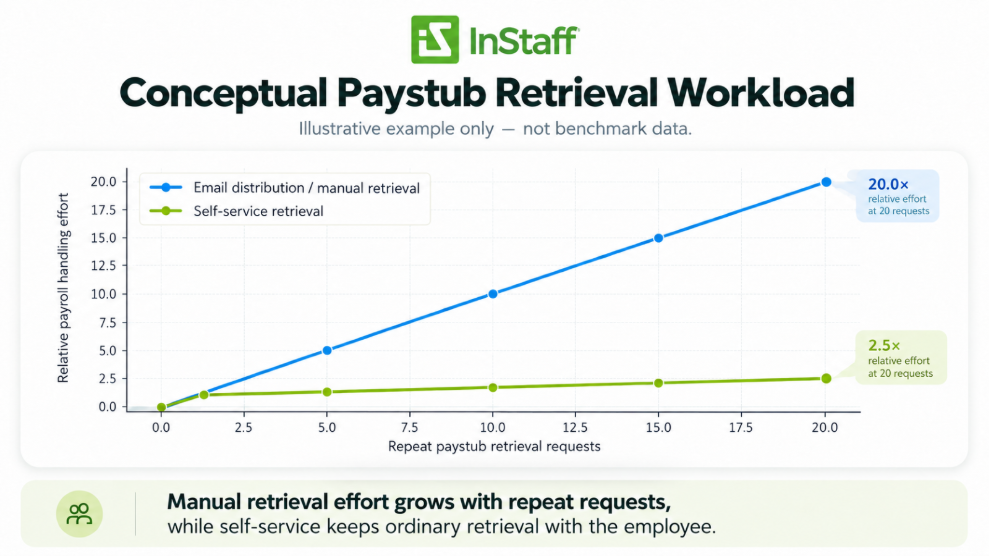
Figure 1. Conceptual workload illustration only, not benchmark data. Manual retrieval effort grows with repeat requests, while self-service keeps ordinary retrieval with the employee.
2. Historical access stops depending on the payroll inbox
Historical paystubs are where the operational difference becomes most visible.
A current paystub may still be easy to find in an inbox. A document from six months or two years ago is more likely to become a payroll request. A self-service model gives employees a known place to return previously published documents.
That matters because the need for a paystub often appears long after the original pay date: mortgage applications, leases, benefit questions, personal recordkeeping, or another administrative requirement.
The goal is to give them appropriate access to their own already-issued documents without requiring payroll to act as the search function every time.
3. Email can become the notification channel instead of the document archive
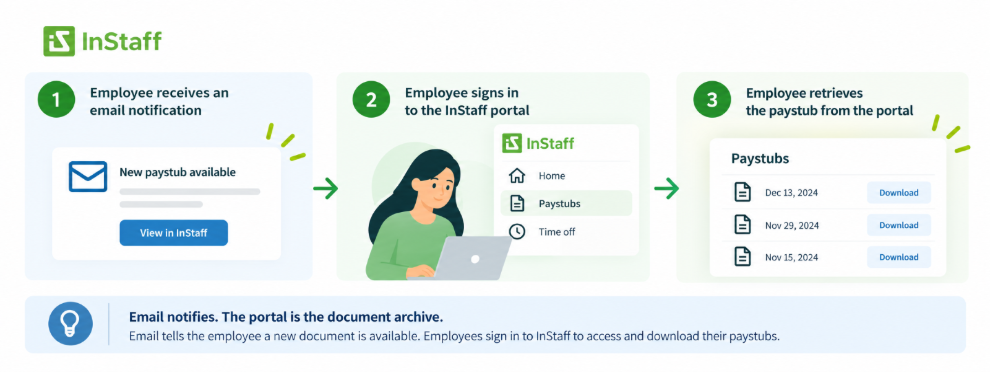
Email can still be useful in a self-service workflow. The role simply changes. Instead of relying on the email itself to be the long-term home of the paystub, payroll can use email to notify the employee that a new document is available.
The employee then signs in to retrieve it from the same location they will use later. That creates a cleaner expectation: email tells the employee something is ready; the portal is where the employee goes to access it.
4. Payroll questions become easier to separate from access requests
A paystub request and a payroll problem are not the same thing. If an employee cannot find a copy, the issue is access. If the employee sees an unexpected deduction, missing hours, or another apparent discrepancy, the issue may require payroll review.
Self-service helps separate those two paths.
Employees retrieve the document themselves, then contact payroll when the content needs explanation or correction. Payroll time is reserved for the part that requires payroll knowledge.
5. The initial distribution process can stay controlled
Moving retrieval into self-service does not mean employees should be able to browse payroll files or see documents that do not belong to them. The publishing workflow still needs to place the correct document in the correct employee account and give administrators a way to verify the distribution step.
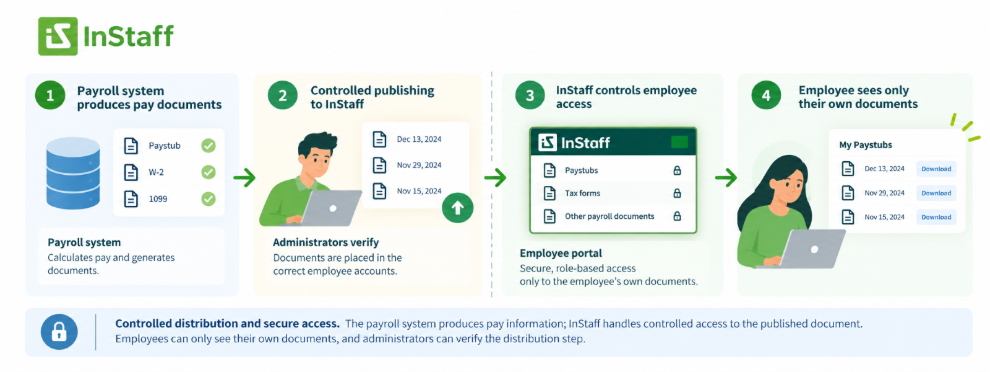
This is where the employee portal and the payroll system can play different roles. The payroll system produces pay information; the employee-facing portal handles controlled access to the published document. For a broader explanation of that separation, see HRIS vs. employee portal.
Email Distribution vs. Paystub Self-Service: Workflow Comparison
The difference is easiest to see as a sequence of handoffs.
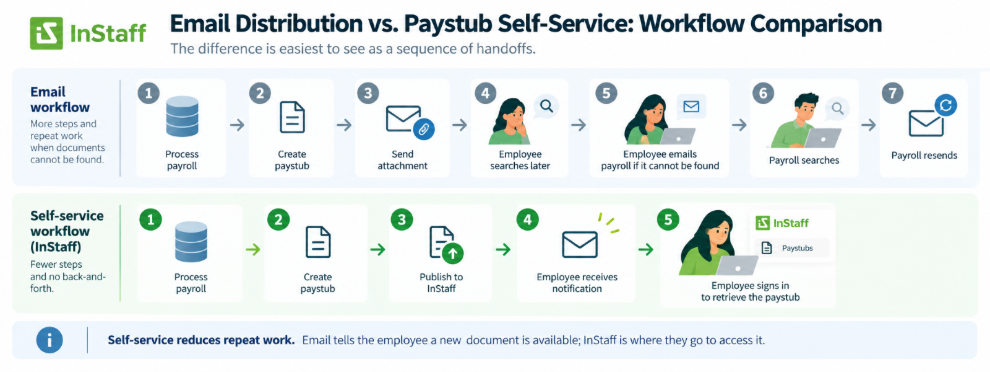
- Email workflow: process payroll → create paystub → send attachment → employee searches later → employee emails payroll if it cannot be found → payroll searches → payroll resends.
- Self-service workflow: process payroll → create paystub → publish to employee account → notify employee → employee retrieves the current or historical document when needed.
The first half of both workflows are similar. The savings appear later, when the same document is needed again.
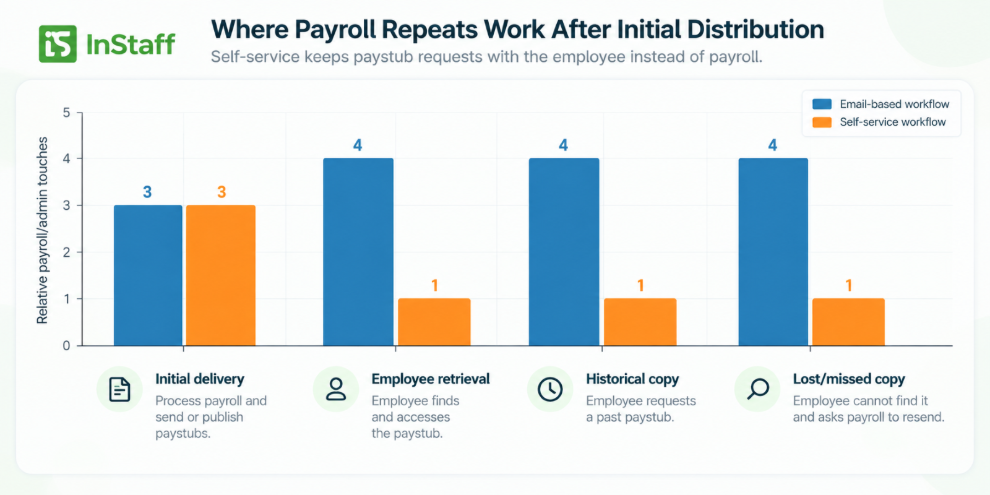
Figure 2. Illustrative process comparison, not measured performance data. The main difference is the number of payroll/admin touches required after the initial distribution.
What Paystub Self-Service Does Not Solve
A portal can remove routine retrieval work, but it does not replace payroll judgment or correct an incorrect source document.
- If a paystub contains an unexpected amount, deduction, or missing information, payroll still needs to investigate the underlying payroll record.
- If the wrong paystub is published, the distribution process still needs correction.
- If an employee cannot access their account, the organization still needs a clear support path for login or identity issues.
- If your organization has legal or regulatory requirements for pay statement delivery, retention, consent, or access, those requirements still apply and should be reviewed for the jurisdictions where you operate.
The objective is narrower and more practical: stop using payroll staff as the manual retrieval layer for documents that have already been issued correctly.
Where InStaff Fits into the Paystub Workflow
InStaff is designed to work alongside an organization’s existing payroll process. Payroll can continue to be processed in the system the company already uses, while InStaff provides the employee-facing distribution and retrieval layer for compatible PDF paystubs.
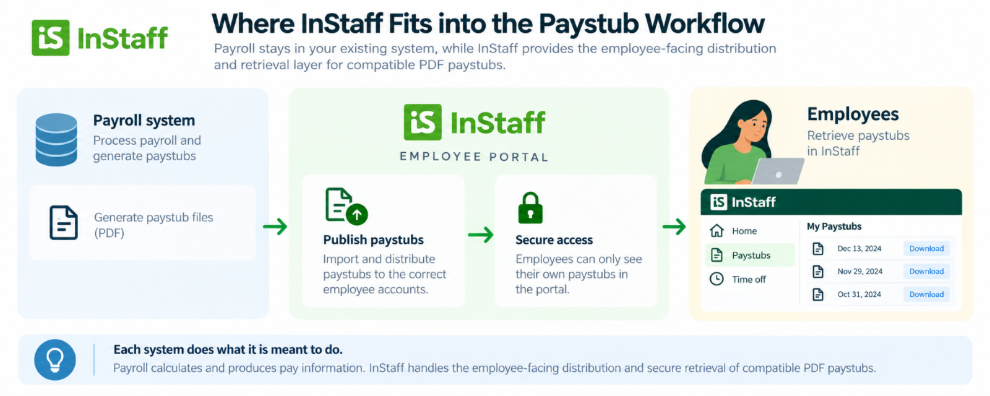
Administrators can upload a PDF containing multiple paystubs or a group of individual PDF files. InStaff can read, sort, split, and route those documents to the appropriate employee accounts based on the configured paystub format. Administrators can review the processed documents before publishing them.
Once published, employees can sign in to view their own paystubs and historical pay documents. Notifications can tell employees that a new document is available, while the portal remains the place they return to when they need the document again.
That means the organization does not have to replace its payroll system simply to change how employees receive and retrieve paystubs.
Paystub Self-Service Checklist for Payroll Teams
Before changing your paystub distribution process, review the full employee and payroll workflow:
- How are paystubs produced today?
- Does payroll send each paystub individually, or can documents be distributed in a batch?
- What happens when an employee cannot find an old paystub?
- How often does payroll resend documents that have already been issued?
- Can employees retrieve historical paystubs without contacting payroll?
- Is the employee notified when a new paystub is available?
- Can payroll verify that documents were routed to the appropriate employee accounts?
- Is there a clear support path for login problems?
- Do employees know the difference between a retrieval issue and a payroll-content question?
- Does the solution work alongside the payroll system the organization already uses?
The strongest self-service workflow is not the one with the most features. It is the one that removes repeated retrieval work while keeping payroll in control of the actual payroll process.
Frequently Asked Questions
What is paystub self-service?
Paystub self-service gives employees a secure employee-facing place to retrieve paystubs that have already been published to them. Instead of asking payroll to send another copy, the employee signs in and accesses the document directly.
Does paystub self-service replace emails completely?
Not necessarily. Email can still be useful for notifications, reminders, or support. The key change is that email no longer must be the only place where the employee can find the paystub. The portal becomes the retrieval location.
Does paystub self-service replace our payroll software?
It does not have to. InStaff can work alongside an existing payroll process by distributing compatible PDF paystubs through an employee portal. The organization can keep the payroll system it already uses while adding a self-service access layer for employees.
What happens if an employee thinks a paystub is wrong?
Self-service helps the employee retrieve the document; it does not decide whether the payroll calculation is correct. Questions about hours, deductions, taxes, earnings, or other pay information should still be reviewed by the appropriate payroll or HR team.
Why does historical paystub access matter to payroll?
Historical access reduces the number of times payroll has to locate and resend documents that were already issued. It also gives employees a consistent retrieval path when they need an older paystub month or years after the original pay date.
Give Employees a Place to Retrieve Paystubs Without Asking Payroll
The biggest change in paystub self-service is what happens the second, third, or tenth time an employee needs the same document.
With an email-heavy process, payroll often stays involved long after the paystub was originally sent. With self-service, payroll publishes the document once, and employees can return to their own paystub history when they need another copy.
That keeps routine retrieval out of the payroll inbox while preserving a clear path back to payroll when the content itself needs attention.
If your organization wants to give employees direct access to paystubs and tax forms while keeping the payroll process you already use, explore InStaff.org to see how we can support your pay document workflow.


