

Employee self-service is supposed to remove routine administrative work.
Employees should be able to find information, submit requests, and complete recurring tasks without turning every question into an email.
But adoption often breaks down for a simple reason: the portal asks employees to work harder than email does.
If someone must find a separate URL, reset a password, navigate an unfamiliar menu, re-enter known information, and then wonder whether the request was received; email starts to feel easier.
Employees often choose the path with less friction.
This guide looks at the friction that pushes employees away from self-service and how to make the portal an obvious place for routine tasks.
What Should Employee Self-Service Actually Do?
A useful employee self-service experience should reduce effort, not simply move a manual process into a new screen. At minimum, the experience should answer five questions quickly:
| Employee question | What the portal should make clear |
| Where do I go? | A predictable place to start the task |
| Can I get in? | Reliable access without unnecessary login friction |
| What do I need to provide? | Clear instructions and only the fields required for the task |
| What happens after I submit? | Visible confirmation, status, or next step |
| Where do I return later? | One consistent place to check the request or record |
When those answers are unclear, employees create their own process through email, chat, or local files. Every workaround creates another place for information to live.
Why Employee Self-Service Adoption Breaks Down
The most common failure points are small points of effort that accumulate until the portal stops feeling worth using.
The ACCESS Framework for Employee Self-Service Adoption
Use the ACCESS framework to review the employee journey: Access, Clarity, Completion, Evidence, Scope, and Simplicity.
| Dimension | Diagnostic question | Failure signal | What good looks like |
| Access | Can employees reach and sign in easily? | Password resets, forgotten URLs, device issues | Predictable entry point |
| Clarity | Can employees tell where the task belongs? | “Who do I send this to?” questions | Plain-language navigation |
| Completion | Can the task be finished in one flow? | Drafts, abandoned forms, duplicate entry | Only necessary fields |
| Evidence | Can employees see that something happened? | Follow-up emails asking for status | Visible confirmation or status |
| Scope | Do employees know what the portal is for? | Portal used for one task but ignored for others | Clear explanation of supported tasks |
| Simplicity | Is the portal easier than the workaround? | Employees return to email or chat | Self-service is the fastest path |
ACCESS framework: a practical diagnostic for employee self-service adoption.
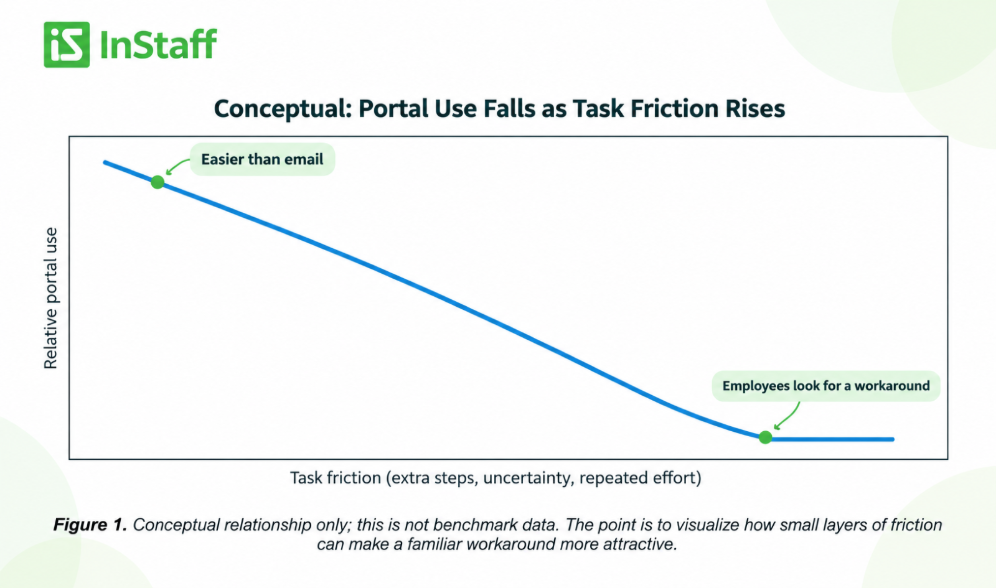
Figure 1. Conceptual relationship only; this is not benchmark data. The point is to visualize how small layers of friction can make a familiar workaround more attractive.
1. Login friction turns a 30-second task into a support request
A portal cannot become the default if employees struggle to reach it.
Forgotten URLs, expired credentials, confusing authentication, or poor mobile access can turn a routine task into a login problem. After a few bad experiences, email feels faster.
Review the full access path from the employee’s perspective: how they find the portal, which device they use, what happens when access fails, and how quickly they can recover.
2. Unclear scope makes employees guess where work belongs
Employees may know the portal exists without knowing what belongs there. If they cannot tell whether to update details, find documents, submit expenses, enter time, or ask a question in the portal, email becomes the universal fallback.
It also helps to separate the system of record from the employee-facing experience. An HRIS and an employee portal can serve different purposes, and employees should not have to understand the underlying system architecture to complete a simple task.
3. Poor navigation makes the employee translate company language
Internal labels often make sense to administrators but not to employees. Someone looking for a tax form or changing an address should not need to know which internal department or module owns the record.
Navigation works better when it starts with employee intent: use task language, keep common actions visible, and avoid sending people through multiple modules for one request.
4. A portal loses when it duplicates email instead of replacing it
If employees still must email after submitting a form, attach the same document twice, or alert a manager separately, the portal has not replaced the old process. It has added a step.
Compare the channels directly. In a self-service workflow versus email, the portal should win on consistency, visibility, and reuse of information. If it cannot, employees will reasonably keep using the familiar channel.
5. No confirmation creates follow-up email
Submission is not the end of the experience. Employees want to know whether a request was received and whether anything else is required. Without feedback, they create a second workflow with “just checking” messages.
A useful self-service process gives employees evidence: a status, comment, history, approval state, or another clear sign that the task is moving.
How to Diagnose Portal Friction Before Blaming Adoption
The quickest way to understand low adoption is to walk through the portal as an employee, not as an administrator who already knows where everything lives.
Choose three to five common tasks and complete each one from the employee’s real starting point. Count the steps, test mobile use, and note every moment where the person must leave the portal or ask what to do next.
Score each ACCESS area from 0 to 5, where 0 means almost no friction and 5 means frequent confusion or extra work. This is not an industry benchmark; it is a simple way to make internal friction visible and prioritize the worst points first.
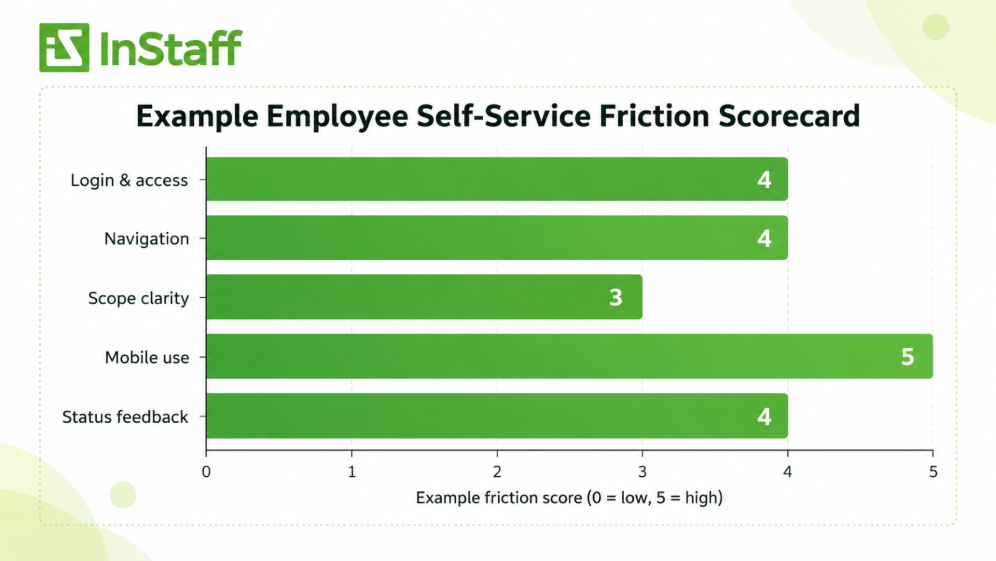
Figure 2. Example diagnostic scoring. Replace these sample scores with findings from your own employee walkthroughs.
A Better Employee Self-Service Rollout
A rollout should teach employees behavior, not introduce a piece of software. The behavior is simple: for certain recurring tasks, start here.
Make the launch message specific. Instead of “we now have an employee portal,” show the tasks employees can complete, where to start, and what happens after submission.
Managers and administrators should reinforce the same path rather than quietly maintaining a parallel email process.
Start with a small set of high-frequency tasks that work well. Once employees learn that the portal reliably gives them a faster result, additional workflows are easier to adopt.
The same principle applies to tasks such as employee expense submission and approval: required details should be captured early, and employees should not have to reconstruct the same information later.
Where InStaff Fits into Employee Self-Service
InStaff gives employees a practical place to handle recurring workforce tasks without turning every request into another email thread. Depending on the organization’s setup, that can include employee information, time-related workflows, documents, expenses, and other self-service processes.
The objective is not to replace every business system. It is to give employees a clearer front door and administrators a more structured way to receive information.
Employees do not need to know which back-office system stores a record. They need to know where to go, what to provide, and what happens next.
Employee Self-Service Adoption Checklist
Before asking employees to use the portal more consistently, review the experience itself:
- Can an employee find the portal without searching for an old email?
- Can they sign in reliably from the device they normally use?
- Are common tasks described in employee language rather than internal system terms?
- Does each task explain what information or documents are required?
- Can the employee avoid re-entering information the company already has?
- Does submission produce visible confirmation or status?
- Can the employee return later and see what happened?
- Do managers redirect supported requests into the portal?
- Have you tested the workflow with employees who did not help configuring the system?
- Do you know where requests are abandoned or repeated questions appear?
If several answers are no, the problem is likely friction, not a lack of reminders.
Frequently Asked Questions
Why do employees avoid employee self-service portals?
Employees often avoid self-service when access is difficult; navigation is unclear, or the process requires more effort than emailing a familiar person. Reminders may increase awareness, but they do not remove workflow friction.
How can we improve employee self-service adoption?
Start with the employee journey: make access reliable, use task-based language, reduce duplicate entry, provide clear confirmation, and focus first on a small set of high-value workflows. Adoption is easier when the portal becomes the shortest path to a result.
Should we stop employees from emailing HR?
Not every question belongs in self-service. Move repeatable, structured tasks into a predictable workflow while leaving room for issues that require judgment or conversation. For supported tasks, consistently point employees to the portal so email does not remain the easier default.
How should we measure employee self-service success?
Useful measures include task completion, repeated login issues, emails that duplicate portal workflows, time to completion, and common support questions. Measure specific workflows rather than relying on a single overall login count.
Make Self-Service Easier Than Email
Employee self-service adoption improves when the portal earns its place in the employee routine. The portal should be easy to find, easy to enter, clear about what belongs there, and complete enough that employees do not need a second email thread.
When those basics are in place, self-service feels like the fastest way to get something done. If your organization wants a clearer employee self-service experience, explore InStaff.org to see how InStaff can support practical employee workflows.


